

Fixxx
Moderator
- Joined
- Aug 21, 2024
- Messages
- 1,054
- Reaction score
- 5,659
- Points
- 113
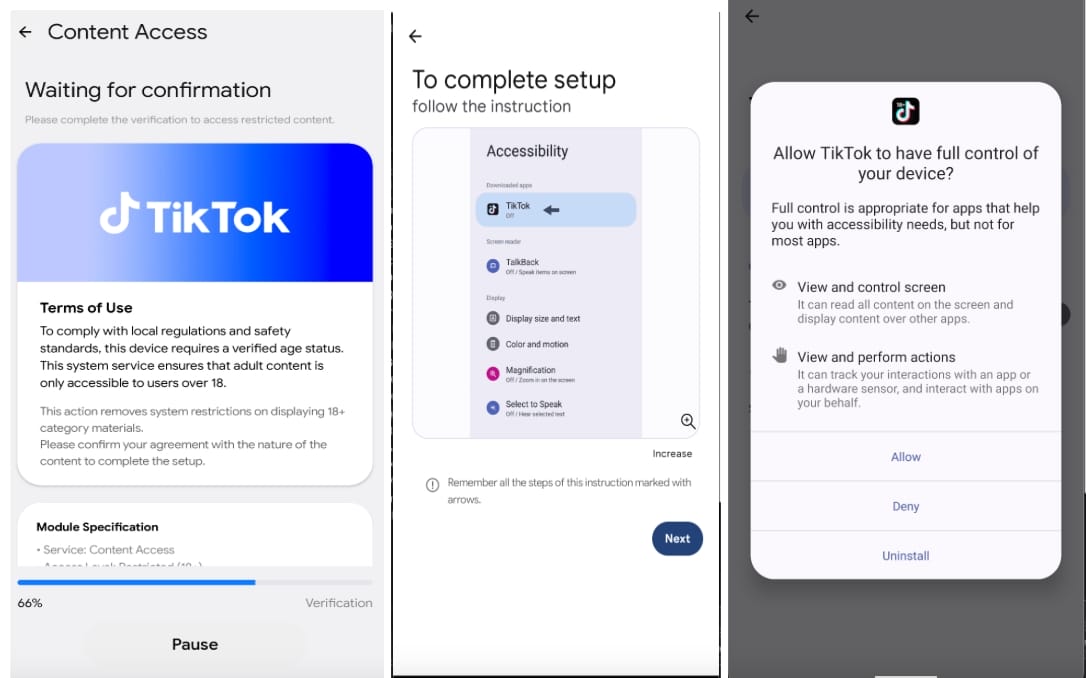
A new Android banking trojan named Rokarolla is targeting 217 banking and cryptocurrency applications using an extensive set of 137 commands. The malware is distributed via malicious websites purporting to provide the Google Chrome or TikTok app, and can take complete administrative control of a compromised device. Its capabilities include stealing lock screen credentials, contact lists, and SMS data, as well as using keyloggers to continuously record user input. During the installation process, the malicious app acts as a dropper and impersonates Google Play Protect, Android’s built-in anti-malware system, offering users the option to install Chrome or TikTok, which include the Rokarolla malware. When launched on the device, Rokarolla requests Accessibility service permissions, as well as access to notifications, SMS, and calls, researchers at mobile security company Zimperium reveal in a report today.
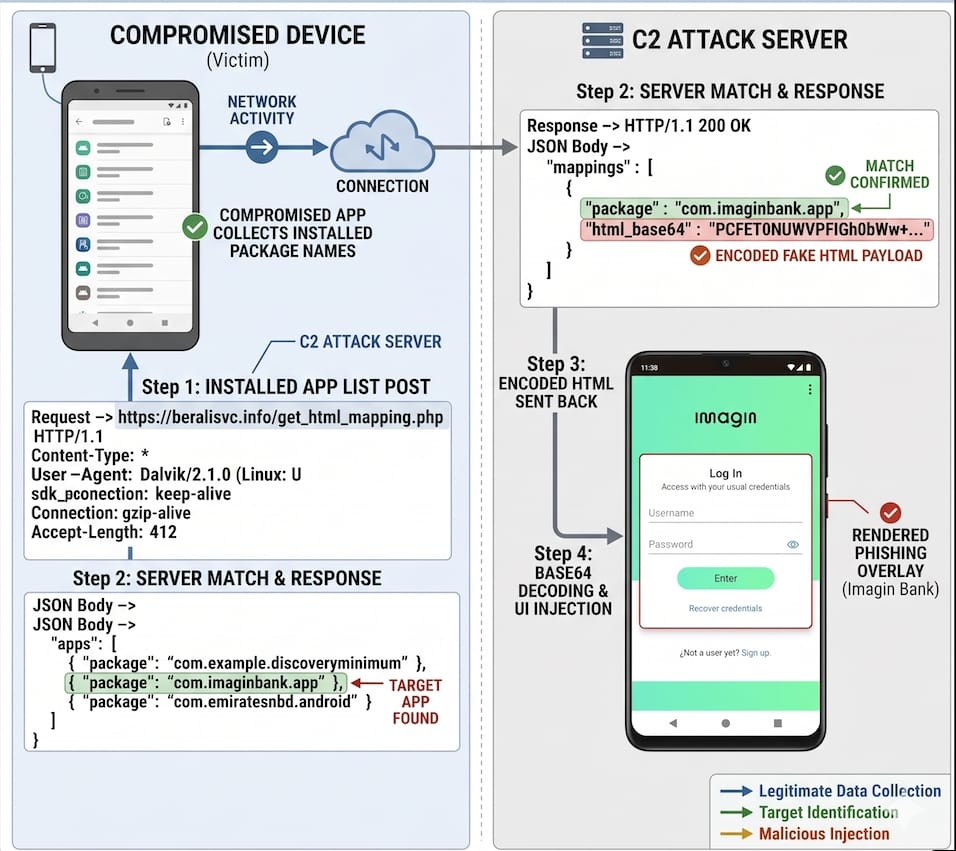
Communication with the command-and-control (C2) server begins with sending a basic device profile containing details such as the phone model, installed Android version, locale, display characteristics, battery level, storage capacity, and available RAM. According to Zimperium, this information is used to generate a unique identifier for each victim in the Rokarolla campaign. Zimperium says the malware’s primary objective appears to be the theft of financial information. To achieve this, it checks the infected device against a list of 217 targeted applications and then downloads the phishing payload corresponding to any matching apps. When the victim opens an app on the list, Rokarolla displays a fake login overlay to steal login credentials, credit card information, and other financial data.
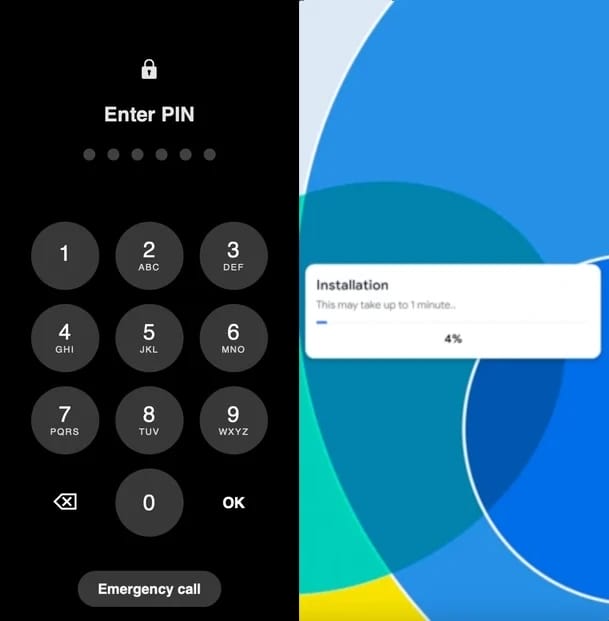
The use of overlays extends beyond data theft, though. The malware also relies on this method to capture the lock-screen PIN/pattern and operate the device even when it is locked. Additionally, overlays are used to hide the malware activity and block user interaction by displaying fake installation screens when needed.
Additional evasion tactics include disabling Google Play Protect, hiding the application icon from the app drawer, silencing audio and vibration, and keeping the screen awake indefinitely. Zimperium created a GitHub repository with all 137 commands available to Rokarolla. Some of the data-theft commands include:
*the installation process.
Communication with the command-and-control (C2) server begins with sending a basic device profile containing details such as the phone model, installed Android version, locale, display characteristics, battery level, storage capacity, and available RAM. According to Zimperium, this information is used to generate a unique identifier for each victim in the Rokarolla campaign. Zimperium says the malware’s primary objective appears to be the theft of financial information. To achieve this, it checks the infected device against a list of 217 targeted applications and then downloads the phishing payload corresponding to any matching apps. When the victim opens an app on the list, Rokarolla displays a fake login overlay to steal login credentials, credit card information, and other financial data.
*financial data theft process.
The use of overlays extends beyond data theft, though. The malware also relies on this method to capture the lock-screen PIN/pattern and operate the device even when it is locked. Additionally, overlays are used to hide the malware activity and block user interaction by displaying fake installation screens when needed.
*PIN overlay (left) and fake installation overlay (right).
Additional evasion tactics include disabling Google Play Protect, hiding the application icon from the app drawer, silencing audio and vibration, and keeping the screen awake indefinitely. Zimperium created a GitHub repository with all 137 commands available to Rokarolla. Some of the data-theft commands include:
- Steal SMS messages
- Extract contact information and WhatsApp contacts
- Capture keystrokes
- Record on-screen content via UI logging
- Copy and manipulate the clipboard contents
- Block incoming calls and bank fraud alerts
- Periodically take screenshots and upload them with timestamps